Make sure your emails arrive
Choose who your event's emails come from, check your organisation's bounce and spam rates and sending domains, and find out why someone isn't getting your emails.
Where to find it: Event admin › Event setup › Start here › Email templates
Every email your event sends comes from an address, and lands in an inbox only if mail providers trust it. Here you choose who each email comes from, and see how your organisation's emails are doing. The figures cover your whole organisation, not only this event.
Choose who an email comes from#
- Open Email templates and click the email, for example Order confirmation.
- In Settings, open Who it's from.
- Choose the From address: Platform default, or one of your organisation's verified senders.
- Type a Sender name, such as your organisation's name, and a Reply-to address for replies.
- Click Save changes.
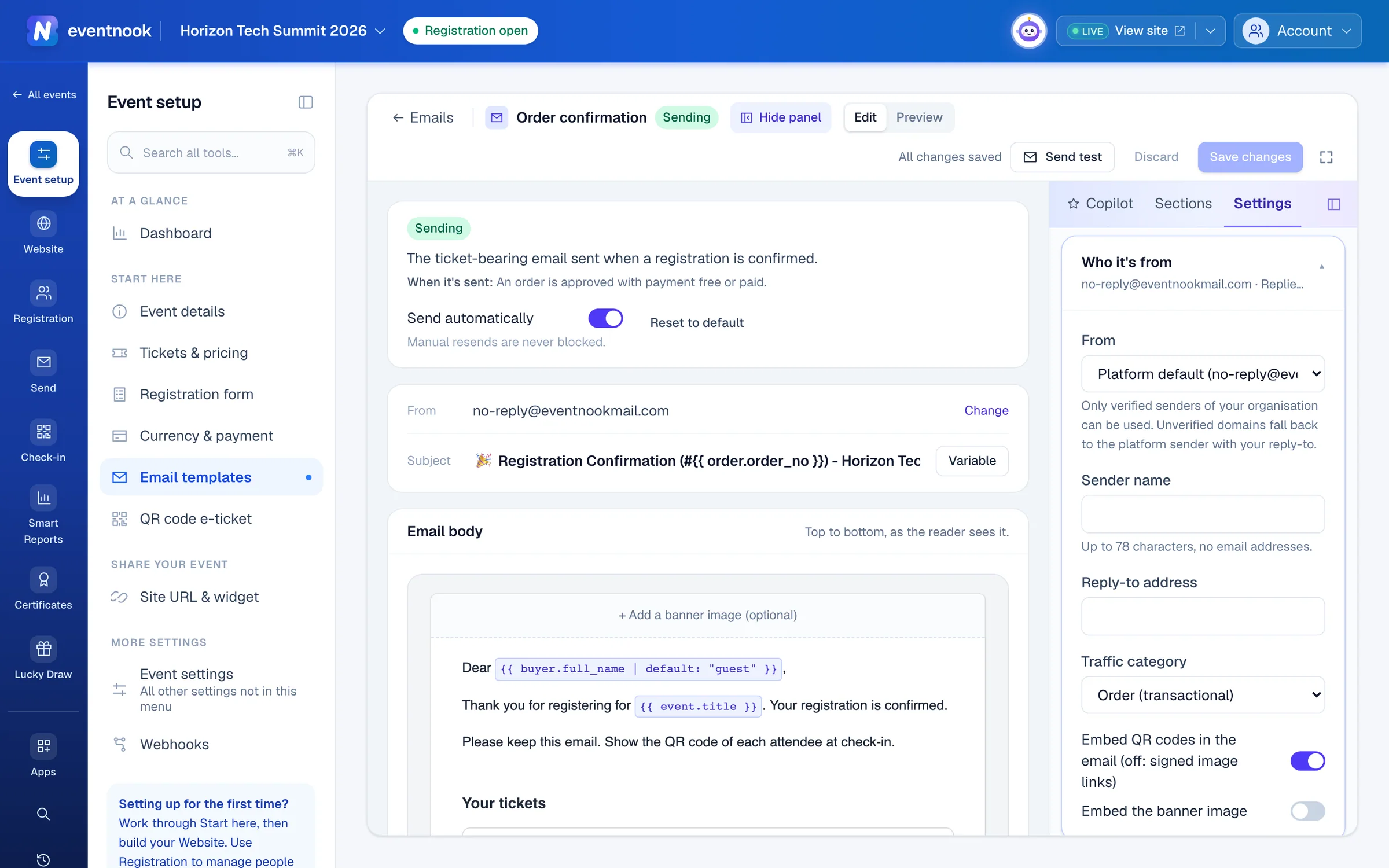
- 1The platform's address, or one of your verified senders
- 2Where replies go
With Platform default, emails come from your organisation's default verified sender if it has one, and otherwise from EventNook's address. Either way they carry your sender name (the organiser's name when you leave it empty), and replies go to your reply-to address. From EventNook's address with no reply-to, replies go to the event's organiser email. Most events need nothing more.
Send from your own domain#
Only verified senders of your organisation can be used. To send from an address at your own domain, such as [email protected], contact EventNook to set up the domain and its senders. Once a sender is verified, it's offered under From. An unverified domain falls back to the platform's address with your reply-to.
Check your sending health#
Open Email templates and click the Deliverability tab.
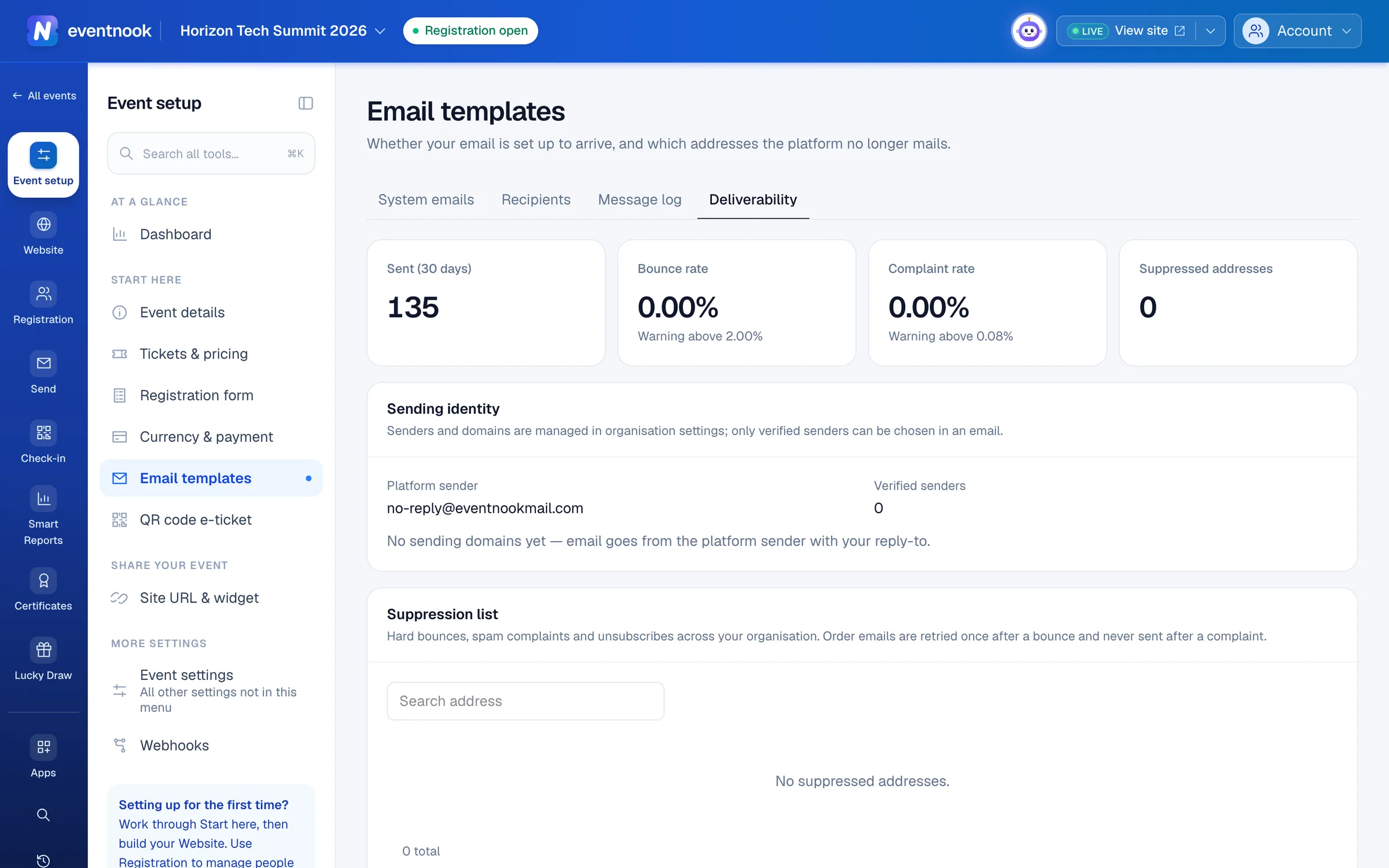
- 1Share of emails that bounced in the last 30 days
- 2Who your emails come from, and your domains' checks
- 3Find out why an address isn't being emailed
| Part | What it tells you |
|---|---|
| Sent (30 days) | How many emails your organisation sent. |
| Bounce rate and Complaint rate | The share that bounced or were reported as spam. Each says the level above which your sending reputation is at risk. |
| Suppressed addresses | How many addresses the platform has stopped emailing. |
| Sending identity | The platform's address, how many verified senders you have, and each sending domain with its SPF, DKIM and DMARC checks. |
| Suppression list | The addresses that bounced, reported your email as spam, or unsubscribed. |
The suppression list is shared by every event of your organisation, so a complaint on one event protects the others. Order emails are tried once more after a bounce, because addresses often get corrected. They are never sent to someone who reported spam.
Find out why someone isn't getting your emails#
- On Deliverability, type their address in Search address.
- If it's listed, the Reason says why: a bounce, a spam complaint or an unsubscribe.
- If the address bounced because it was mistyped, correct it on the order and resend.
If the address isn't listed, check the message log for what happened to the email.
Email a corrected address again#
An organisation admin can click Remove on the address's row and confirm. For a spam complaint, they also tick I confirm the recipient asked to receive email again. Then resend the email from the order.
If something looks wrong#
- The bounce rate is high. Check registrations for mistyped addresses, and don't import lists of people who didn't register.
- A domain shows ✗ for SPF, DKIM or DMARC. Its DNS records are missing or wrong. Contact EventNook with the domain's name; it's checked again automatically once the records are fixed.
- "No sending domains yet". Email goes from the platform's address with your reply-to. Nothing is wrong.
- Your sender isn't offered under From. It isn't verified yet. Ask EventNook.
- The page shows an error instead of the figures. Your role can't see organisation-wide figures. Ask an organisation admin.
Who can do this#
Everyone with access to the event's settings can open Deliverability; the figures need access to your organisation. Editors and event admins can choose an email's sender. Only organisation owners and admins can remove an address from the suppression list, one at a time.
Related guides
- Change the emails your event sendsWrite the confirmation and other emails your event sends by itself, turn them on or off, choose who gets copies and check whether an email arrived.
- Email your attendees or buyersWrite one email to your attendees or the people who placed orders, choose exactly who gets it, and send it now or at a time you choose.
Still stuck? In EventNook, ask HeyNook. It knows the page you're on and your event, and can take you straight to the right setting.